Plant Handler in Interactive Mode
In interactive mode the user will have the option to interactively specify both which operation should be performed and what parameters should be used. To run the module in interactive mode the following command should be specified from the root of plant-network-segmentation folder:
python -m src.__main__ -i
The above command runs the plant handler __main__ as a module in interactive mode. Invoking the command will present the following screen, which displays an interactive menu:
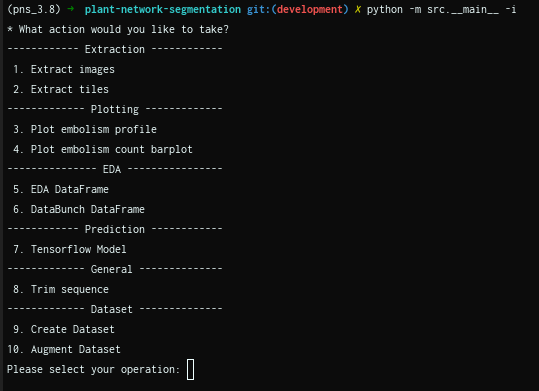
The possible actions that can be taken are easily viewed by looking at the interactive menu. Once an action is selected, further input prompts will be presented. Once all parameters have been provided by the user, there will be an option to re-enter any arguments which need to change. If the user is happy with their inputs they will be given the option to save this configuration in a json file.
While the interactive mode makes proving arguments to the program easier, it can be laborious to do many times - especially if same configuration is to be used again. To address this, the handler can also be run using a json file saved while using interactive mode. By doing this the plant handler will be run with the exact same configuration as was used in the session that the json file was saved; of course there is also the option to edit this json. To run the plant handler using an interactive mode json the following command should be used:
python -m src.__main__ -j <interactive_mode.json>
Note
The -j flag should not be confused with -fj flag, which is used to provide a json when using command line mode.
The interactive mode templates, and some notes regarding each action is shared below. However, it is worth noting that these files will be created automatically when saving at the end of interactive mode.
Extraction
Images
JSON template
{
  "which": "extract_images",
  "leaves": {
    "input": {
      "folder_path": [
        "test1/test2/",
        "test3/"
      ],
      "filename_pattern": [
        "*.png",
        "*.tif"
      ]
    }
    "format": {
      "shift_256": true
    }
  },
  "masks": {
    "input": {
      "mpf_path": [
        "test1/test2/multipage1.tif",
        "test3/multipage2.tif"
      ]
    }
  },
  "leaf_output_path": "test1/test2/extracted/leaves/test2_leaf.png;test3/extracted/leaves/test3_leaf.png",
  "mask_output_path": "test1/test2/extracted/masks/test2_mask.png;test3/extracted/masks/test3_mask.png",
  "overwrite": true,
  "binarise": false
}
Note
If shift_256 is set to false the image will be loaded in a uint8 format
Tiles
If the default name should be used to save the image tiles, please enter “default” when prompted. Using the default name will create a folder called “<image>-chips” - where <images> will either be leaves or masks - in the parent folder of where your images are located. The image tiles will have the same name as their parent image with it’s number added at the end. For example if a parent image is called leaf_1, and there are 10 tiles per image, the tiles will be named as image_1_<i>.png, where i will indicate the tile number; this will be repeated for each tile.
Warning
Using custom file names to save the tile is not currently working. Rather use “default”
JSON template
{
  "which": "extract_tiles",
  "leaves": {
  "input": {
    "folder_path": [
      "test1/test2/extracted/leaves/",
      "test3/leaves/extracted/"
    ],
    "filename_pattern": [
      "*.png",
      "*.png"
    ]
  }
    "format": {
      "shift_256": true
    }
  },
  "masks": {
  "input": {
    "folder_path": [
      "test1/test2/extracted/masks/",
      "test3/extracted/masks/"
    ],
    "filename_pattern": [
      "*.png",
      "*.png"
    ]
  }
  },
  "leaf_output_path": "test1/test2/extracted/leaf-chips/*.png;test3/extracted/leaf-chips/*.png",
  "mask_output_path": "test1/test2/extracted/leaf-chips/*.png;test3/extracted/leaf-chips/*.png",
  "overwrite": true,
  "stride_x": 256,
  "stride_y": 256,
  "length_x": 256,
  "length_y": 256
}
Plotting
Embolism profile
JSON template
{
  "which": "plot_profile",
  "leaves": {
   "input": {
    "folder_path": [
      "test1/test2/extracted/leaves/",
      "test3/leaves/extracted/"
    ],
    "filename_pattern": [
      "*.png",
      "*.png"
    ]
  }
    "format": {
      "shift_256": true
    }
  },
  "masks": {
  "input": {
    "folder_path": [
      "test1/test2/extracted/masks/",
      "test3/extracted/masks/"
    ],
    "filename_pattern": [
      "*.png",
      "*.png"
    ]
  }
  },
  "output_path": "test2.svg;test3.svg",
  "leaf_names": "Leaf 1;Leaf 2",
  "show": false
}
Embolism count
JSON template
{
  "which": "plot_embolism_counts",
  "leaves": {
  "input": {
    "folder_path": [
      "test1/test2/extracted/leaves/",
      "test3/leaves/extracted/"
    ],
    "filename_pattern": [
      "*.png",
      "*.png"
    ]
  }
    "format": {
      "shift_256": true
    }
  },
  "masks": {
  "input": {
    "folder_path": [
      "test1/test2/extracted/masks/",
      "test3/extracted/masks/"
    ],
    "filename_pattern": [
      "*.png",
      "*.png"
    ]
  }
  },
  "output_path": "test2.svg;test3.svg",
  "leaf_names": "Leaf 1;Leaf 2",
  "show": false,
  "leaf_embolism_only": false,
  "tile": true,
  "percent": true
}
EDA
EDA DF
JSON template
{
   "which": "eda_df",
   "leaves": {
     "input": {
       "folder_path": [
         "test1/test2/extracted/leaves/",
         "test3/leaves/extracted/"
       ],
       "filename_pattern": [
         "*.png",
         "*.png"
       ]
     }
    "format": {
      "shift_256": true
    }
   },
   "masks": {
     "input": {
       "folder_path": [
         "test1/test2/extracted/masks/",
         "test3/extracted/masks/"
       ],
       "filename_pattern": [
         "*.png",
         "*.png"
       ]
     }
   },
   "csv_output_path": "test2.csv;test3_eda.csv",
   "tiles": false,
   "eda_df_options": {
     "linked_filename": false,
     "unique_range": true,
     "embolism_percent": true,
     "intersection": true,
     "has_embolism": false
   }
}
DataBunch DF
JSON template
{
   "which": "databunch_df",
   "leaves": {
     "input": {
       "folder_path": [
         "test1/test2/extracted/leaves/",
         "test3/leaves/extracted/"
       ],
       "filename_pattern": [
         "*.png",
         "*.png"
       ]
     }
    "format": {
      "shift_256": true
    }
   },
   "masks": {
     "input": {
       "folder_path": [
         "test1/test2/extracted/masks/",
         "test3/extracted/masks/"
       ],
       "filename_pattern": [
         "*.png",
         "*.png"
       ]
     }
   },
   "csv_output_path": "test2.csv;test3_eda.csv",
   "tiles": false,
   "leaf_embolism_only": true,
   "tile_embolism_only": true
}
Predict
TF 2 Model
JSON template
{
  "which": "predict",
  "leaves": {
    "input": {
      "folder_path": [
        "test1/test2/extracted/leaves/"
      ],
      "filename_pattern": [
        "*.png"
      ]
    },
    "format": {
      "shift_256": true
    }
  },
  "masks": {
    "input": {
      "folder_path": [
        "test1/test2/extracted/masks/"
      ],
      "filename_pattern": [
        "*.png"
      ]
    }
  },
  "model_path": "test1/data/run_data/saved_models/test_model/",
  "leaf_shape": "512 512 1",
  "threshold": 0.5,
  "csv_path": "test.csv"
}
General
Trim
JSON template
{
   "which": "trim_sequence",
   "leaves": {
     "input": {
       "folder_path": [
         "test1/test2/extracted/leaves/",
         "test3/leaves/extracted/"
       ],
       "filename_pattern": [
         "*.png",
         "*.png"
       ]
     }
    "format": {
      "shift_256": true
    }
   },
   "masks": {
     "input": {
       "folder_path": [
         "test1/test2/extracted/masks/",
         "test3/extracted/masks/"
       ],
       "filename_pattern": [
         "*.png",
         "*.png"
       ]
     }
   },
   "y_size_dir": "(1000, -1);None",
   "x_size_dir": "(1280, 1);(960,-1)",
   "overwrite": true,
   "mask": false
}
Dataset
Create Dataset
JSON template
{
  "which": "create_dataset",
  "leaves": {
    "input": {
      "folder_path": [
        "test1/test2/"
      ],
      "filename_pattern": [
        "*.png"
      ]
    },
    "format": {
      "shift_256": true
    }
  },
  "masks": {
    "input": {
      "folder_path": [
        "/test1/test2/masks/"
      ],
      "filename_pattern": [
        "*.png"
      ]
    }
  },
  "dataset_path": "/test1/new_dataset/",
  "downsample_split": 0.6,
  "val_split": 0.2,
  "test_split": 0.2,
  "lolo": ""
}